

¿Tienes dudas cuando recargas tu coche eléctrico?
Aquí te respondemos a las dudas que puedas tener en el momento de cargar tu coche en TotalEnergies
1. Antes de empezar
Conoce la potencia de carga de tu vehículo
- Consulta el manual de tu coche para saber la potencia máxima de carga (kW) que acepta.
2. Elige el conector adecuado

- AC (7-22kW):
Usa cable Tipo 2 (T2) - estándar en Europa.

- DC (50kW hasta más de 200 kW):
Usa combo CCS o CHAdeMO - a tu disposición en el cargador.
3. Inicia la recarga correctamente

Sigue estos pasos:
- Selecciona el conector desde la pantalla del cargador o tu App y lanza la recarga siguiendo los pasos indicados.
- Después, conecta el cable del vehículo.

Tip: Si conectas tu coche antes de seleccionar tu conector, el sistema marcará el punto de recarga como “Ocupado” y no podrás iniciar la carga. Si este fuera el caso desconecta el coche y vuelve a seguir los pasos.
4. Métodos de pago e inicio de sesión
4.1. Por tarjeta bancaria desde el terminal de pago
- Selecciona el conector desde la pantalla del cargador, sigue las instrucciones de la pantalla y paga directamente en el terminal con tu tarjeta bancaria y conecta tu vehículo.
- Pagarás el precio público que aparece en la pantalla del cargador o en la App de TotalEnergies Charge Europe.
- Al realizar el pago se genera una pre-autorización. La cantidad cobrada aparecerá en el terminal de pago y no te preocupes, porque esta cantidad será reembolsada por tu banco después de la carga.
- No se generará factura.

4.2. Por tarjeta bancaria desde la App Charge Europe
- Descarga la App Charge Europe desde tu App Store
- Selecciona el conector desde la App e inicia la recarga siguiendo los pasos indicados en la App, y conecta tu vehículo.
- Puedes iniciar la recarga sin crear una cuenta si lo deseas.
Tip: Te recomendamos crear una cuenta y registrarte en la “Tarjeta Virtual”, y obtener los siguientes beneficios:
- No se harán pre-autorizaciones cuando inicias una carga
- Te enviaremos una facturación semanal
- Podrás descargar tus recibos o facturas desde la App.
4.3. Por tarjeta de movilidad eléctrica (eMSP)
- Selecciona el conector desde la pantalla del cargador.
- Pasa la tarjeta de movilidad Charge + ( o la de otro Operador eMSP) en el lector del cargador para conectar tu coche.
- Para finalizar la recarga, vuelve a pasar la tarjeta de movilidad en el lector RFID.
- El pago con tarjeta eMSP no genera pre-autorizaciones.
- Si recargas con una tarjeta eMSP que no es de Charge+ de TotalEnergies, consulta el precio directamente con tu operador de movilidad.
- Si recargas con Charge+ de TotalEnergies, consulta el precio aplicado según tu perfil, directamente desde la App Charge+.
Tip: Varios operadores de movilidad permiten iniciar una recarga sin tarjeta, simplemente desde su App. Si tienes alguna duda al respecto, contacta con tu operador de movilidad.
Si quieres obtener tu tarjeta Charge+:
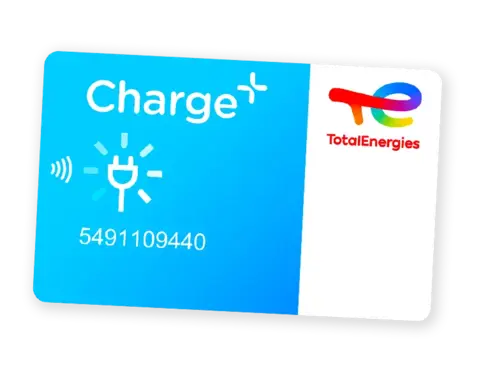
- Suscríbete desde la web: https://subscription.chargeplus.totalenergies.com/es y sigue los pasos hasta finalizar la suscripción.
- Dentro del proceso de suscripción, puedes elegir la opción "Smart" con abono mensual, con el que podrás beneficiarte de un 10% de descuento en todos los puntos de recarga operados por TotalEnergies.
- Una vez suscrito, tu tarjeta te llegará en menos de una semana.
5. Información importante durante tu proceso de recarga

- ¿Qué son las pre-autorizaciones? Las pre-autorizaciones son bloqueos temporales en tu cuenta que aseguran que dispones de fondos suficientes para cubrir el coste estimado de la recarga. No se trata de un cobro definitivo; el importe retenido se libera una vez finalizada la operación, y el tiempo de devolución depende de tu banco.
Tip: Evita las pre-autorizaciones en tus recargas con la tarjeta virtual Charge Europe o el abono Charge+.

- ¿Qué hacer si tienes el cable bloqueado?
Abre y cierra el vehículo con el mando o presiona el botón de desbloqueo de tu coche, tal y como viene explicado en el manual de instrucciones del fabricante.
.webp?option=default&outputWidth=70&outputHeight=80 "TotalEnergies Marketing España")
- ¿Iniciaste una sesión de recarga y no recibiste el correo electrónico que te permite parar la recarga?
Revisa tu carpeta de correo no deseado de tu correo electrónico o llama a nuestro teléfono de atención al cliente: +34 828 008 154 disponible 24/7. - ¿Necesitas una factura de empresa?
Para obtener una factura, debes tener una cuenta creada en la App Charge Europe o Charge+ con tu DNI registrado ANTES de iniciar la recarga. Escribe al buzón [email protected] para que podamos mandarte tu factura de forma posterior a tu recarga.
Descarga en el siguiente QR tanto para iOS y Android si todavía no disfrutas de nuestra App Charge Europe para una recarga fácil y sencilla en nuestros cargadores.
Android | iOS |


Do you have questions when charging your electric car?
Here we answer any doubts you may have when charging your car at TotalEnergies.
1. Before you start
Know your vehicle’s charging power
- Check your car manual to find out the maximum charging power (kW) it supports.
2. Choose the right connector
- AC (7-22kW):
Use a Type 2 (T2) cable – the European standard.
- DC (50kW to over 200 kW):
Use CCS Combo or CHAdeMO – available on the charger.
3. Start the charging session correctly
Follow these steps:
- Select the connector from the charger screen or from your App and start the charging session following the on‑screen instructions.
- Then, plug the cable into your vehicle.
Tip: If you plug your car in before selecting the connector, the system will mark the charging point as “Occupied,” and you won’t be able to start the session. If this is the case, disconnect the car and follow the steps again.
4. Payment methods and login options
4.1. Paying by bank card at the payment terminal
- Select the connector on the charger screen, follow the instructions, pay directly at the terminal with your bank card, and then plug in your vehicle.
- You will pay the public price shown on the charger screen or in the TotalEnergies Charge Europe App.
- A pre‑authorization will be generated when you pay. The amount will appear on the payment terminal it will be refunded by your bank after the charging session.
- No invoice will be issued.
4.2. Paying by bank card through the Charge Europe App
- Download the Charge Europe App from your App Store.
- Select the connector through the App, start the charging session following the steps shown, and then plug in your vehicle.
- You can start a session without creating an account if you wish.
Tip: We recommend creating an account and registering for the “Virtual Card” to enjoy these benefits:
- No pre‑authorizations when starting a charging session
- Weekly invoicing
- You can download your receipts or invoices from the App
4.3. Paying with an electric mobility card (eMSP)
- Select the connector on the charger screen.
- Tap your Charge+ mobility card (or another eMSP operator card) on the card reader to connect your car.
- To end the session, tap the mobility card again on the RFID reader before unplugging.
- eMSP card payments do not generate pre‑authorizations.
- If you charge with an eMSP card that is not from TotalEnergies Charge+, check pricing directly with your mobility operator.
- If you charge with TotalEnergies Charge+, check the price applied according to your profile directly in the Charge+ App.
Tip: Many mobility operators allow you to start a charge without a physical card, simply through their App. If you have any questions, contact your mobility operator.
If you want to get your Charge+ card:
- Subscribe on the website: https://subscription.chargeplus.totalenergies.com/es and follow the steps until completing the subscription.
- During the subscription process, you can choose the “Smart” option with a monthly fee and benefit from a 10% discount on all charging points operated by TotalEnergies.
- Once subscribed, your card will arrive in less than one week.
5. Important information during your charging session
- What are pre‑authorizations?
Pre‑authorizations are temporary holds in your account to ensure you have sufficient funds to cover the estimated charging cost. They are not final charges; the held amount is released once the session is complete. Refund times depend on your bank.
Tip: Avoid pre‑authorizations by using the virtual card in Charge Europe or the Charge+ subscription.
- What if the cable is locked?
Lock and unlock your vehicle with the remote control or press the unlock button as explained in your vehicle’s user manual.
- Did you start a charging session but didn’t receive the email to stop the charge?
Check your spam folder or call our customer service number: +34 828 008 154, available 24/7. - Do you need a company invoice?
To receive an invoice, you must create an account in the Charge Europe or Charge+ App with your ID (DNI) registered before starting the charge.
Write to: [email protected] so we can send your invoice after your charging session.
Download our Charge Europe App for an easy and seamless charging experience at our stations using the QR code below (Android and iOS).
Android | iOS |